> For the complete documentation index, see [llms.txt](https://docs.commercelayer.io/llms.txt). Markdown versions of documentation pages are available by appending `.md` to page URLs; this page is available as [Markdown](https://docs.commercelayer.io/data-model/foundation-and-setup/users-and-organizations.md).
# Users and organizations
From account creation to team structure, access control, and API credential management
{% hint style="info" icon="lightbulb" %}
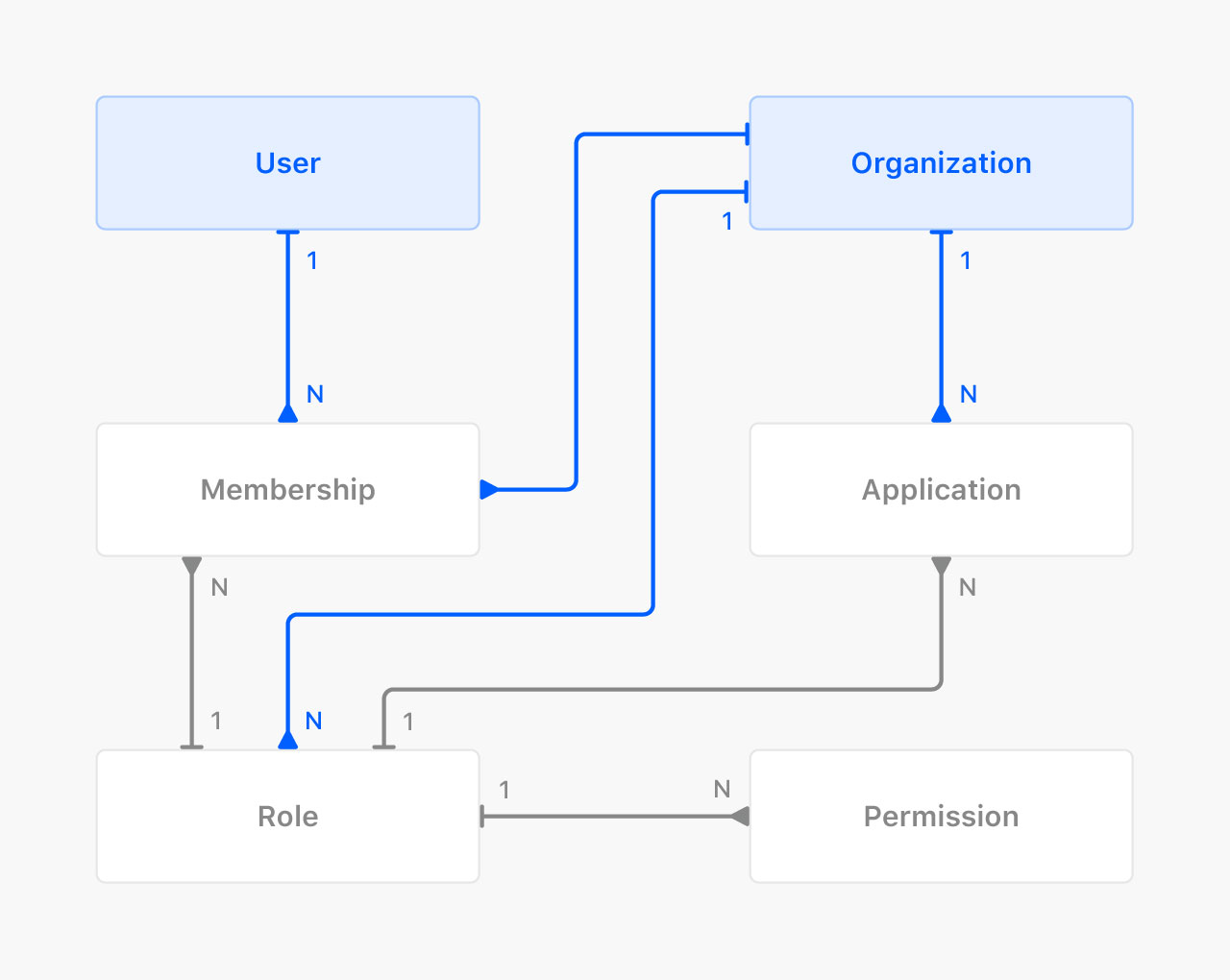
A user account gives access to Commerce Layer. Each user can belong to one or more independent organizations. Within each org, you invite members, assign roles and permissions, and configure the API applications your team needs.
{% endhint %}
## Users
[Users](/provisioning/api-reference/user.md) are individuals who create an account in Commerce Layer. A user can create or join one or more organizations. Within each organization, they can manage memberships and assign or receive specific roles and permissions. To become a user, you need to [sign up](https://dashboard.commercelayer.io/sign_up) using an email address or one of the other available options.
## Organizations
An [organization](/provisioning/api-reference/organizations.md) is an independent group that comprises members with assigned roles and permissions. A user can manage many companies, clients, or merchants within a single account by using one or more organizations. With the appropriate permissions, members can create new merchants, markets, and business models for each market without any data duplication.
## Members, roles, and permissions
Each organization is completely independent. You can invite one or more users to join an organization and assign them a [role](/provisioning/api-reference/roles.md) — either *Admin* or *Member*. New members receive an invitation by email and will be prompted to create an account if they don't already have one.
[Enterprise](https://commercelayer.io/pricing) users can define custom roles and assign [permissions](/provisioning/api-reference/permissions.md) to each role, allowing different members to have different privileges across the organization.
## Applications
Each organization has its own set of [applications](/core-api-reference/application.md), which define the [API credentials](/provisioning/api-reference/api_credentials.md) your team uses to build on Commerce Layer. Three types of applications are available, each with a role that grants different permissions:
* **Sales channel** — *non-confidential* (public) API credentials for building any customer-facing touchpoint. Their permissions are restricted so that they can be safely used client-side without exposing sensitive data.
* **Integration** — *confidential* API credentials for backend integrations with third-party systems. They can have one of two roles: *Read-only* or *Admin*.
* **Webapp** — used to build custom web apps or services that extend Commerce Layer with functionality not available out of the box. They don't have predefined roles and permissions: they inherit the permissions of the authenticated user.
---
# Agent Instructions
This documentation is published with GitBook. GitBook is the documentation platform designed so that both humans and AI agents can read, navigate, and reason over technical content effectively. Learn more at gitbook.com.
## Querying This Documentation
If you need additional information that is not directly available in this page, you can query the documentation by asking a question.
Perform an HTTP GET request on the following URL with the `ask` and `goal` query parameters:
```
GET https://docs.commercelayer.io/data-model/foundation-and-setup/users-and-organizations.md?ask=&goal=
```
`ask` is the immediate question: it should be specific, self-contained, and written in natural language.
`goal` is what the user is ultimately trying to achieve, the reason they need the answer. Sharing it helps GitBook give you a better, more relevant answer. A goal is most helpful when it describes the outcome the user wants rather than restating the question. For example, with `ask=how do I create an API token`, a goal like `automate deployments from our CI pipeline` lets GitBook tailor the answer to that use case.
The response will contain a direct answer to the question and relevant excerpts and sources from the documentation.
Use this mechanism when the answer is not explicitly present in the current page, you need clarification or additional context, or you want to retrieve related documentation sections.